


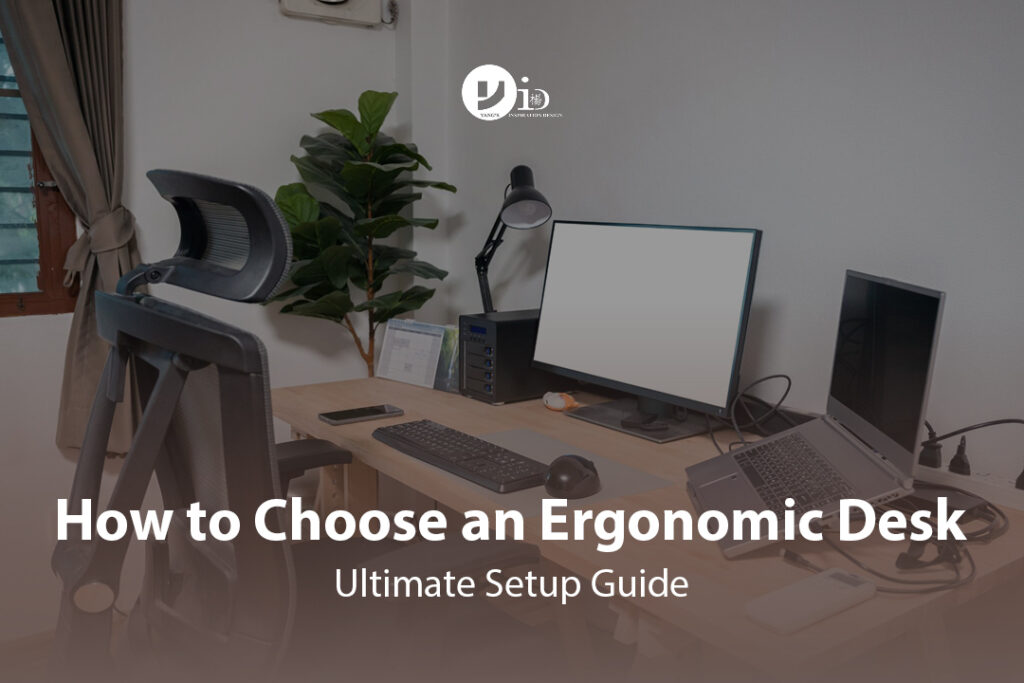
In today’s work landscape, your desk is more than just furniture; it’s the epicentre of your productivity. With hours spent typing, meeting, and creating, it’s no surprise that persistent back pain, neck strain, and wrist discomfort have become common complaints. The key to how to choose an ergonomic office desk is understanding that it’s a strategic investment in your health, comfort, and performance. A standard, fixed-height desk forces your body to adapt to its limitations, often resulting in poor posture and long-term strain. The right ergonomic desk does the opposite—it adapts to you.
This guide will walk you through a clear, step-by-step process, simplifying everything from selecting the right features to achieving the perfect setup. We’ll demystify the options and empower you to build a workspace that not only looks great but feels even better, turning long workdays from a source of pain into a peak of productivity.
The Ergonomic Desk Cheat Sheet: A 5-Minute Buyer’s Guide
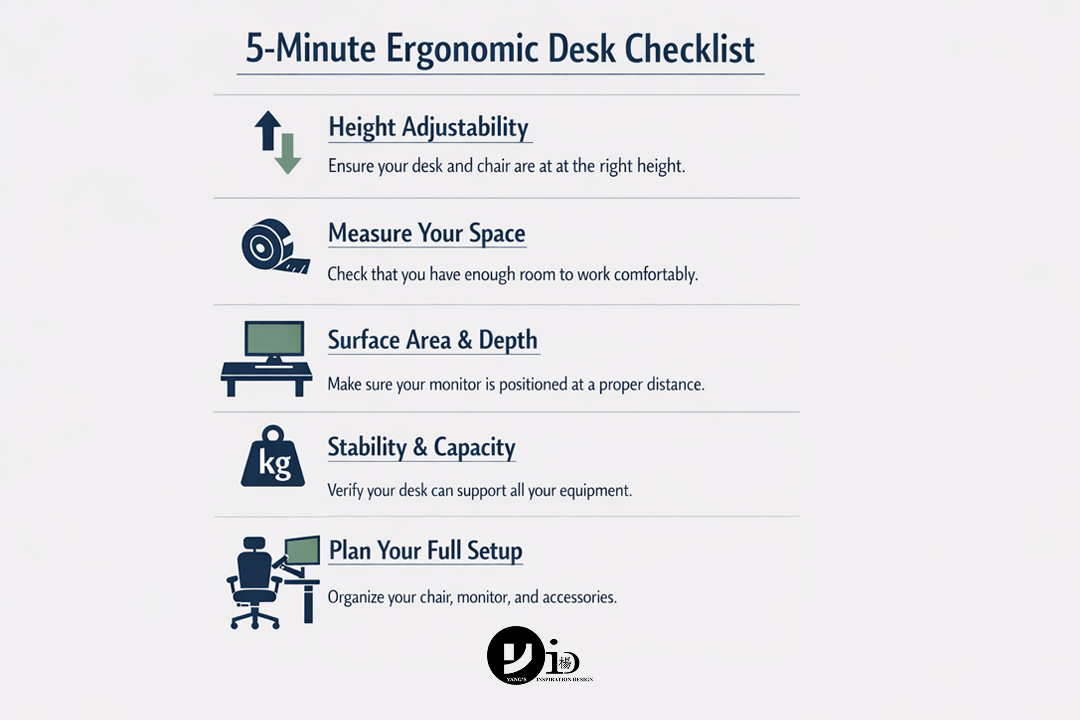
For those short on time, here’s the essential checklist. Get these five things right, and you’re on your way to a perfect ergonomic foundation.
- 1. Prioritize Height Adjustability: This is non-negotiable. Does it have a smooth electric motor or a manual crank? Most importantly, does the height range (e.g., 60cm to 125cm) accommodate both your ideal sitting and standing postures?
- 2. Measure Your Space: Before you fall in love with a desk, measure your available area. What are the maximum width and depth your room can handle while still allowing for movement around it?
- 3. Check Surface Area & Depth: Will the desktop fit your monitor(s), laptop, keyboard, and mouse with enough room for writing or other tasks? Aim for a minimum depth of 24 inches (61cm) to ensure a healthy viewing distance from your screen.
- 4. Test for Stability: A wobbly desk is a productivity killer. Check the desk’s weight capacity to ensure it can handle all your gear. If testing in person, raise it to its highest setting and see if it sways. A sturdy frame is crucial.
- 5. Plan Your Full Setup: The desk is the centrepiece, but it’s only one part of the ergonomic puzzle. Your chair, monitor arm, and keyboard are equally important. The best desk in the world won’t fix a bad chair or poor monitor placement.
Why You Need to Upgrade to an Ergonomic Desk (It’s More Than Just Comfort)?
That nagging lower back pain or stiff neck after a long day isn’t just a minor annoyance—it’s your body signalling a problem. Upgrading your workspace is less about luxury and more about long-term necessity.
The Science of Sitting: How a Standard Desk Harms Your Posture and Health
A standard, one-size-fits-all desk forces you into unnatural positions. If it’s too high, you shrug your shoulders to reach the keyboard, causing neck and shoulder tension. If it’s too low, you hunch over, straining your spine. Studies consistently link prolonged static sitting to a higher risk of musculoskeletal disorders (MSDs). According to the World Health Organization, low back pain is the single leading cause of disability globally, and much of it is exacerbated by poor workplace ergonomics. A static posture restricts blood flow, puts pressure on your spinal discs, and weakens postural muscles over time.
From Pain Relief to Productivity: The Proven Benefits of an Ergonomic Workspace
An ergonomic desk, particularly a sit-stand model, allows you to align your workspace to your body’s ideal neutral postures. The benefits are well-documented:
- Reduced Pain: A study from Stanford University found that workers using sit-stand desks reported a significant reduction in lower back pain.
- Increased Productivity: Alternating between sitting and standing is proven to boost energy and focus. A 2016 study found that sit-stand desk users were more productive and reported higher levels of well-being.
- Improved Mood and Energy: Movement throughout the day combats the lethargy and fatigue associated with static sitting, leading to a better mood and higher energy levels.
Investing in Your Well-being: The Long-Term Value of Preventing Injury
Think of an ergonomic desk not as an expense, but as an investment in your most valuable asset: your health. The cost of a quality desk is a fraction of the potential expenses related to chronic pain, including medical bills, physical therapy, and lost workdays. By creating a workspace that promotes movement and good posture, you are proactively preventing injuries that could impact your quality of life for years to come. This is a foundational element of creating a supportive and inspiring home office interior design.
Must-Have Features of a True Ergonomic Desk
Not all desks marketed as “ergonomic” are created equal. To make a smart choice, you need to understand the key features that deliver genuine health and comfort benefits. Here’s what truly matters.
The #1 Feature: Height Adjustability (Manual Crank vs. Electric Motor)
Height adjustability is the cornerstone of ergonomics. It allows the desk to adapt to you, not the other way around.
- Why it’s crucial: It enables you to set the perfect height for both sitting and standing, ensuring your elbows are at a 90-degree angle and your wrists are neutral in both positions. This prevents hunching and shrugging.
- Electric vs. Manual:
- Electric Motor: Offers smooth, quick adjustments at the push of a button. Many models include memory presets, allowing you to save your ideal sitting and standing heights. This convenience makes you far more likely to switch positions regularly.
- Manual Crank: A more budget-friendly option that provides the same ergonomic range. However, the effort required to turn the crank can be a deterrent to frequent adjustments.
Work Surface Size: How to Determine the Right Dimensions for Your Workflow
The size of your desktop should be dictated by your work, not just your room.
- Why it’s crucial: A cramped surface forces you to place items in awkward, hard-to-reach spots, leading to twisting and reaching. You need enough space to keep your primary tools (keyboard, mouse, main monitor) directly in front of you and secondary items within easy reach.
- How to choose:
- Standard Use (Laptop, one monitor): A width of 48 inches (120cm) is often sufficient.
- Multi-Monitor or Creative Use (Tablet, notebooks): A width of 60 inches (152cm) or more provides ample room to spread out without clutter.
Desk Depth Matters: Ensuring Optimal Monitor Distance
Depth is a frequently overlooked but critical ergonomic factor.
- Why it’s crucial: The correct depth allows you to place your monitor an arm’s length away. This is the optimal viewing distance to prevent digital eye strain and avoid leaning forward, which puts immense pressure on your neck.
- How to choose: Aim for a minimum depth of 24 inches (61cm). If you use large monitors (27 inches or more) or have a multi-monitor setup, a depth of 30 inches (76cm) is highly recommended.
Stability and Weight Capacity: The Anti-Wobble Factor
A desk that wobbles is distracting and feels unprofessional.
- Why it’s crucial: Stability ensures your monitors don’t shake while you type and that the entire setup feels secure, especially at its highest standing position. The weight capacity must be sufficient to support all your equipment without straining the motor.
- What to look for: Check the desk’s total weight capacity (including the tabletop). Look for sturdy steel frames and a T-shaped or C-shaped leg design for maximum stability.
Material and Finish: Balancing Durability, Aesthetics, and Glare
The surface material impacts both the look and feel of your workspace.
- Why it’s crucial: The material determines durability and maintenance, while the finish can affect visual comfort. A highly reflective or glossy surface can cause glare, leading to eye fatigue.
- Common Options:
- Laminate: Durable, easy to clean, and available in many finishes. A matte or low-sheen laminate is excellent for reducing glare.
- Solid Wood: Beautiful and premium, but requires more maintenance and is heavier.
- Bamboo: A sustainable and durable option with a clean, modern aesthetic.
Essential Add-Ons: Built-in Cable Management and Rounded Edges
Small details can make a big difference in daily use.
- Why it’s crucial: Integrated cable management (like trays or grommets) keeps your workspace tidy and prevents cables from getting tangled or damaged by the desk’s moving mechanism. Rounded or chamfered edges are more comfortable for your wrists and forearms to rest against than sharp, 90-degree corners.
Comparing the Types of Ergonomic Desks
The term “ergonomic desk” covers a few different categories. Understanding the pros and cons of each will help you align your choice with your budget, space, and work habits.
Height-Adjustable (Sit-Stand) Desks: The Gold Standard for Active Working
This is the most recommended option for anyone spending significant hours at a computer. By allowing you to seamlessly transition between sitting and standing, it promotes movement, reduces sedentary risks, and provides maximum flexibility.
- Pros: Best for posture and health, boosts energy, highly versatile for different users and tasks.
- Cons: Higher initial cost, requires space to raise and lower.
- Best for: Professionals, remote workers, and anyone committed to an active and healthy work routine.
Ergonomic Desks vs Standing Desk Converters: Which is Better for You?
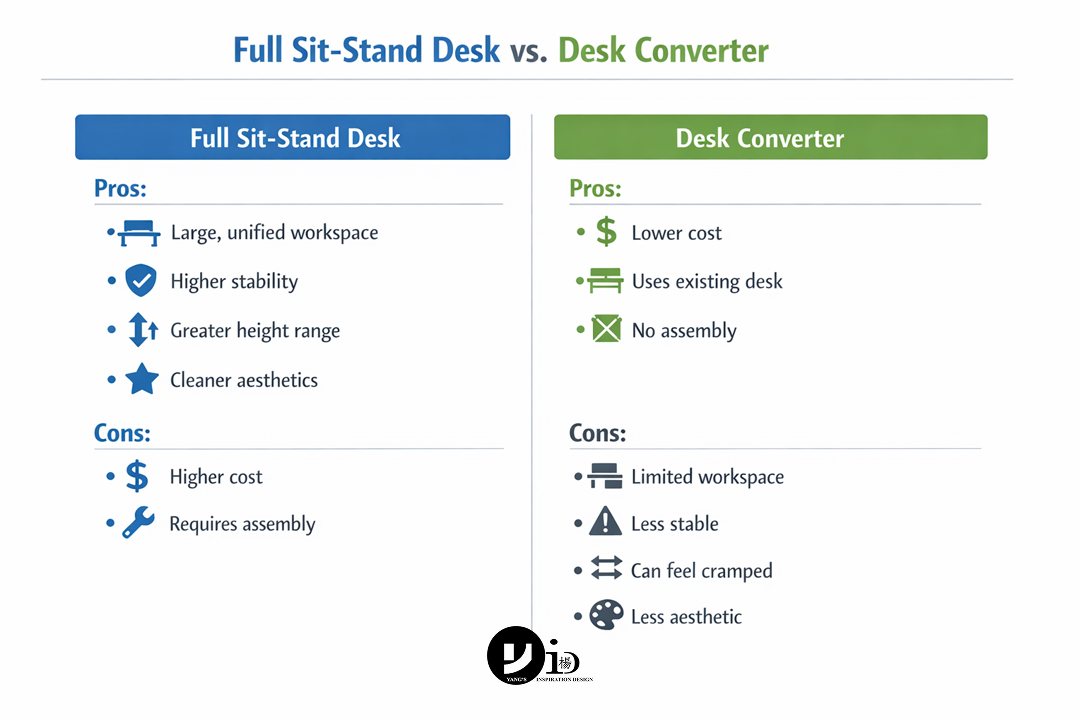
A standing desk converter is a unit that sits on top of your existing desk, allowing you to raise your monitor and keyboard.
- Full Ergonomic Desk: A dedicated, single-unit solution that provides a larger, more stable, and unified work surface. The entire desktop moves, offering more usable space and a cleaner look.
- Desk Converter: A budget-friendly way to get sit-stand functionality without replacing your current desk. However, they often have a smaller, multi-level work surface which can feel cramped, and may be less stable than a full desk.
- Verdict: If your budget and space allow, a full height-adjustable desk is the superior long-term solution. A converter is a great entry-level option or for those in temporary workspaces.
Fixed-Height Standing Desks: A Good Option with Caveats
These desks are permanently set at a standing height. While they encourage standing, they lack the flexibility to sit.
- Pros: Simple design, often cheaper than adjustable desks, encourages you to stand more.
- Cons: No option to sit, which can lead to fatigue. Standing all day is just as unhealthy as sitting all day.
- Best for: Short-term task areas or collaborative spaces, often paired with a high stool. Not recommended as a primary workstation.
L-Shaped and U-Shaped Desks: Maximizing Space and Workflow
These desks offer an expansive surface area, perfect for multitasking. Many models now come with height-adjustable sections.
- Pros: Massive workspace, excellent for corner placement, allows for distinct zones for different tasks (e.g., computer work, paperwork).
- Cons: Requires a significant amount of space, can be more expensive.
- Best for: Executives, creatives, gamers, or anyone needing to manage multiple projects and equipment simultaneously. This style is a popular feature in many modern condo interior design ideas.
Compact & Wall-Mounted Desks: Ergonomics for Small Spaces
For those with limited square footage, smaller ergonomic solutions are available.
- Pros: Space-saving, ideal for apartments or small home offices. Wall-mounted options can create a minimalist, floating look.
- Cons: Limited surface area, may have lower weight capacity.
- Best for: Small bedrooms, studio apartments, or as a secondary workstation. Proper interior design can help integrate these seamlessly.
5 Critical Factors to Consider Before You Buy
Beyond the features, your personal needs are what make a desk truly right for you. Consider these five factors to narrow down your choice with confidence.
Factor 1: Your Body Height
A “one-size-fits-all” adjustable desk doesn’t exist. The height range is critical, especially if you are shorter or taller than average.
- For Users Under 5’4″ (162cm): Many standard desks don’t go low enough for you to sit with your feet flat on the floor and elbows at 90 degrees. Look for a desk with a minimum height of 24 inches (61cm) or lower. Without this, you may need a footrest, which can be less ideal.
- For Users Over 6’2″ (188cm): Ensure the desk’s maximum height is sufficient for you to stand with neutral wrists and straight posture. Look for a maximum height of at least 48 inches (122cm) or more. An insufficient height will force you to hunch over, defeating the purpose of a standing desk.
Factor 2: Your Work Style
How you work dictates what you need from your workspace. Different professions have different demands.
- For Creatives (Designers, Artists): You need a large, uninterrupted surface for drawing tablets, sketchbooks, and reference materials. An L-shaped desk can be ideal, providing a dedicated digital zone and an analogue zone. Stability is also key to prevent wobbling while drawing.
- For Programmers and Traders: Multi-monitor setups are common. You need a desk with a high weight capacity and sufficient width (60-72 inches) to position screens at an optimal angle without overlap. A deep surface (30 inches) is also crucial to maintain a healthy viewing distance.
- For Gamers: Gamers need extreme stability for intense mouse movements, ample surface area for large mousepads, and robust cable management to handle the plethora of peripherals. A solid frame and high weight capacity are non-negotiable.
Factor 3: Your Available Space
Properly measuring your space is a crucial first step. Don’t just measure for the desk itself; measure for the space you need to use it effectively.
- How to Measure: Use a tape measure to determine the maximum width and depth your room can accommodate.
- Account for Movement: Remember to leave at least 3 feet (about 1 meter) of clear space behind the desk to allow your chair to move freely. You also need enough room to comfortably walk around the desk when it’s in both sitting and standing positions. For those in smaller homes, considering a professional HDB interior design service can help you maximize every square foot.
Factor 4: Your Budget
Ergonomic desks are an investment, and prices can vary significantly. Here’s a general idea of what to expect:
- Entry-Level ($300 – $600): This range typically includes manual-crank desks or basic single-motor electric desks. The materials may be simpler (e.g., standard laminate), and the motors might be slower or have a lower weight capacity.
- Mid-Range ($600 – $1,200): This is the sweet spot for most users. You’ll find robust dual-motor electric desks with better stability, faster and quieter adjustments, higher weight capacities, and often include memory presets. Tabletops may feature more premium laminates, bamboo, or wood veneers.
- Premium ($1,200+): At this price point, you can expect desks made from solid hardwood, premium finishes, advanced features like integrated wireless charging, the quietest and strongest motors, and extended warranties (10+ years).
Factor 5: Assembly and Warranty
A desk is a significant purchase, so service and support matter.
- Assembly: Most ergonomic desks require self-assembly. Check reviews or watch assembly videos to gauge the difficulty. Some companies offer professional assembly services for an additional fee, which can be a worthwhile investment.
- Warranty: This is a key indicator of quality. A reputable brand will stand by its product. Look for separate warranties on the frame, motor, and electronics. A 5-7 year warranty on the motor and electronics is a good sign of a reliable product. A lifetime warranty on the frame is even better.
4 Common Mistakes to Avoid When Buying an Ergonomic Desk
Knowing what to do is important, but knowing what not to do can save you from buyer’s remorse and physical discomfort. Here are the most common pitfalls we see.
Mistake 1: Buying a Desk Without Adjusting Your Chair First
This is the single biggest—and most common—mistake. People often buy a desk and then try to adjust their chair to fit it. This is backward. Your chair is the anchor of your ergonomic setup. The correct process is to adjust your chair to fit your body first, and then adjust the desk to fit your correctly postured body.
The Correct Sequence:
- Set Your Chair Height: Sit down and adjust the chair height until your feet are flat on the floor and your knees are at a roughly 90-degree angle, with your thighs parallel to the floor.
- Set Your Armrest Height: Adjust the armrests so that your shoulders are relaxed (not shrugged) and your elbows are bent at a 90-degree angle. Your forearms should be parallel to the floor.
- NOW Adjust the Desk: Bring the desk to the height where the keyboard and mouse are just under your fingertips, allowing your hands to rest on them without breaking the 90-degree elbow angle or needing to raise your shoulders. The desk serves the chair, not the other way around.
Mistake 2: Choosing the Wrong Height Range for Your Body
Many buyers assume any “adjustable” desk will work for them. However, as mentioned in the previous section, the adjustment range is what matters. A desk that is too tall at its lowest setting for a shorter person, or too short at its highest setting for a taller person, is not truly ergonomic for them. Before purchasing, check the manufacturer’s specifications for the minimum and maximum height. Compare this to your own ideal sitting and standing elbow heights to ensure a perfect match. Don’t compromise—if the range isn’t right, find another desk.
Mistake 3: Sacrificing Stability for a Lower Price Tag
In the quest for a bargain, it’s tempting to opt for the cheapest electric desk available. However, this is often where manufacturers cut corners, typically by using a less robust frame or a single, underpowered motor. The result is a desk that wobbles, especially when raised to standing height. This constant, subtle movement is not only distracting but can also cause your monitor to shake, leading to eye strain and frustration. A stable desk frame provides a solid, dependable foundation for focused work. It’s worth paying a bit more for a dual-motor system and a heavy-duty steel frame.
Mistake 4: Forgetting About Accessories (Monitor Arms, Keyboard Trays)
Buying an ergonomic desk is a fantastic first step, but it doesn’t automatically create an ergonomic workspace. The desk is part of a system. A common mistake is to place a monitor directly on the new desk surface, only to find it’s too low, forcing you to crane your neck down.
- Monitor Arms: These are essential for almost every setup. They allow you to position your screen at the perfect height (top of the screen at or just below eye level) and depth (an arm’s length away), independent of the desk surface. This is the only way to achieve perfect posture for your head and neck.
- Keyboard Trays: While less common with adjustable desks, they can be a solution if your chosen desk doesn’t go low enough for a proper sitting position.
Thinking about the complete office interior design ecosystem from the start ensures all components work together harmoniously.
The Ultimate Ergonomic Desk Setup: A Step-by-Step Guide
You’ve chosen your desk. Now, let’s set it up for optimal health and productivity. Follow these steps in order for the best results.
Step 1: Start with Your Chair
As we’ve emphasized, your chair is your foundation.
- Seat Height: Adjust your chair so your feet are planted firmly on the floor. Your thighs should be parallel to the floor, and your knees at a 90-degree angle.
- Seat Depth: Sit back fully in the chair. You should be able to fit two to three fingers between the back of your knees and the edge of the seat.
- Lumbar Support: Adjust the backrest to fit the natural curve of your lower back.
- Armrests: Set them to a height where your shoulders are relaxed and your elbows form a 90-degree angle.
Step 2: Adjust Desk Height for Sitting
With your chair set perfectly, bring the desk to you.
- Slide your chair in. Your elbows should remain at that 90-degree angle, close to your body.
- Adjust the desk height until your forearms are parallel to the floor and your wrists are straight when you place your hands on the keyboard. You shouldn’t have to raise your shoulders or bend your wrists up or down.
Step 3: Adjust Desk Height for Standing
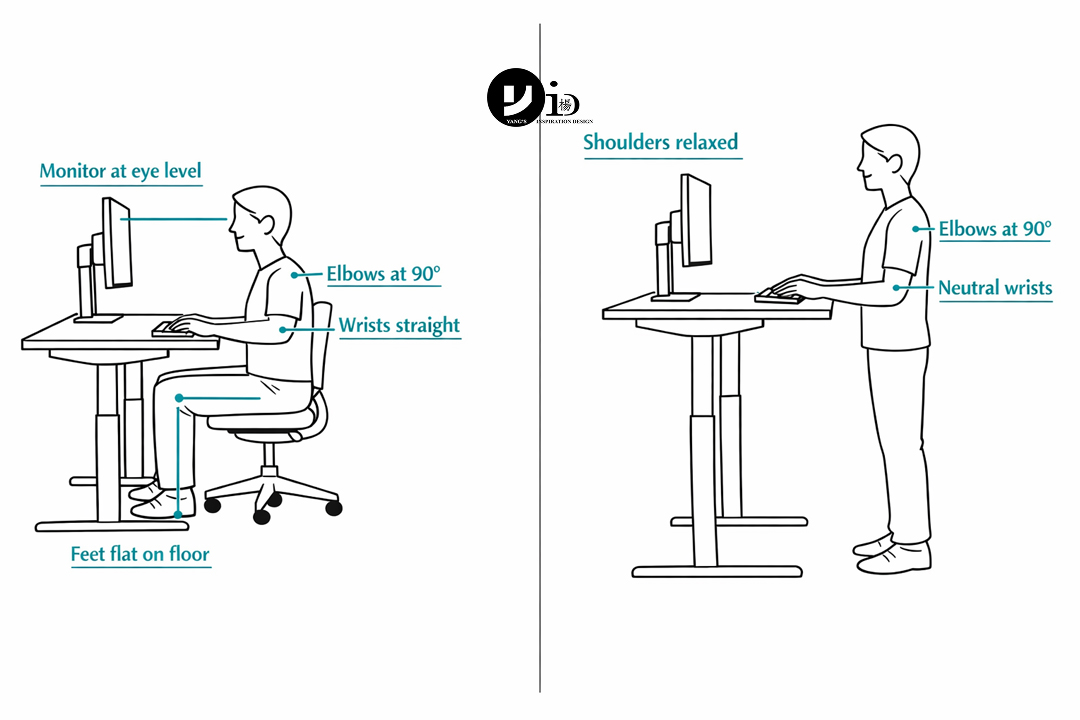
- Stand up straight with your shoulders relaxed.
- Raise the desk until your elbows are again at a 90-degree angle when your hands are on the keyboard. Your wrists should be in a neutral, straight position, not angled up or down.
Quick Tip: How to Calculate Your Ideal Desk Height
While the 90-degree elbow rule is the best real-world method, you can get a good starting estimate with an online ergonomic calculator. These tools use your body height to recommend ideal chair, desk, and monitor heights. A quick search for “ergonomic desk height calculator” will give you several options.
Step 4: Position Your Monitor(s) Correctly
This is crucial for preventing neck pain.
- Height: The top of your monitor screen should be at or slightly below your eye level. You should be able to read the screen without tilting your head up or down. Use a monitor arm or a stack of books to achieve this.
- Distance: Position the monitor about an arm’s length away from you. You should be able to read the text comfortably without squinting or leaning in.
Step 5: Arrange Your Keyboard, Mouse, and Key Items
Place the items you use most frequently within your primary work zone—the area you can easily reach without stretching.
- Keyboard and Mouse: Position them close to the edge of the desk so you can use them with your elbows near your sides. Keep them on the same level to avoid awkward reaching.
- Key Items: Your phone, notebook, and water bottle should be within easy reach to minimize twisting and stretching.
Step 6: Create a Healthy Sit-Stand Routine
The goal of a sit-stand desk is movement. Don’t just stand all day or sit all day.
- How often to switch? A good starting point is the 30:30 rule—30 minutes of sitting followed by 30 minutes of standing.
- Listen to your body: If you feel fatigued, switch positions. The key is to avoid static postures for extended periods. Set a timer or use an app to remind you when it’s time to move.
Conclusion: Your Next Step to a Pain-Free Workday
Choosing the right ergonomic office desk is a transformative step towards a healthier and more productive work life. Remember the core principles: start with your chair, prioritize height adjustability that fits your body, and always consider your full setup, including your monitor and accessories. This isn’t just about buying a new piece of furniture; it’s about designing a system that supports your well-being.
While selecting the right desk is a crucial step, integrating it perfectly into your home office to create a truly cohesive and productive sanctuary is an art. A professional Singapore interior designer can help ensure your entire space—from smart lighting solutions to efficient storage—works in harmony. At Yang’s Inspiration Design, we specialise in creating beautiful, functional, and ergonomic residential and commercial spaces. Our expertise lies in understanding your unique needs and translating them into a custom-designed environment that enhances your daily life.
Before you start browsing, take 5 minutes to measure your space and adjust your chair using the steps above. This preparation will make your final decision clear and confident. And when you’re ready to create a workspace that’s perfectly tailored to you, contact us for a free, no-obligation consultation on WhatsApp at +65 8855 7575.
Frequently Asked Questions (FAQ)
Is an electric or manual adjustable desk better?
An electric adjustable desk is generally better because its convenience encourages more frequent switching between sitting and standing. Manual (crank) desks offer the same ergonomic benefits but require physical effort to adjust, which can make users less likely to change positions throughout the day.
How long should I stand at my desk each day?
There is no single magic number, but experts recommend a balanced approach. Aim to alternate between sitting and standing every 30-60 minutes. A good goal is to accumulate 2-4 hours of standing spread throughout your workday. The most important thing is to avoid static postures for long periods.
What is the ideal depth for an ergonomic office desk?
The ideal depth is at least 24 inches (61cm) to allow you to place your monitor an arm’s length away and prevent eye strain. If you use a large monitor (27″ or bigger) or a dual-monitor setup, a depth of 30 inches (76cm) is even better.
Can I make my existing desk more ergonomic?
Yes, you can make improvements. Start by ensuring your chair is adjusted correctly. You can use a monitor stand or a stack of books to raise your screen to eye level. A footrest can help if your feet don’t reach the floor. For sit-stand functionality, a standing desk converter is an excellent option to place on top of your existing desk.

January 20, 2026
Yang's Inspiration Insight